WPA3 vs WPA2: which Wi-Fi security setting should you choose?
Somewhere in your router's admin pages is a dropdown with four or five entries, most of which are obsolete, one of which is a compromise, and one of which the Wi-Fi Alliance now requires of every certified device. The names give nothing away. The published specifications, fortunately, are very specific about what each setting permits — including the one weakness the standards body documented itself.
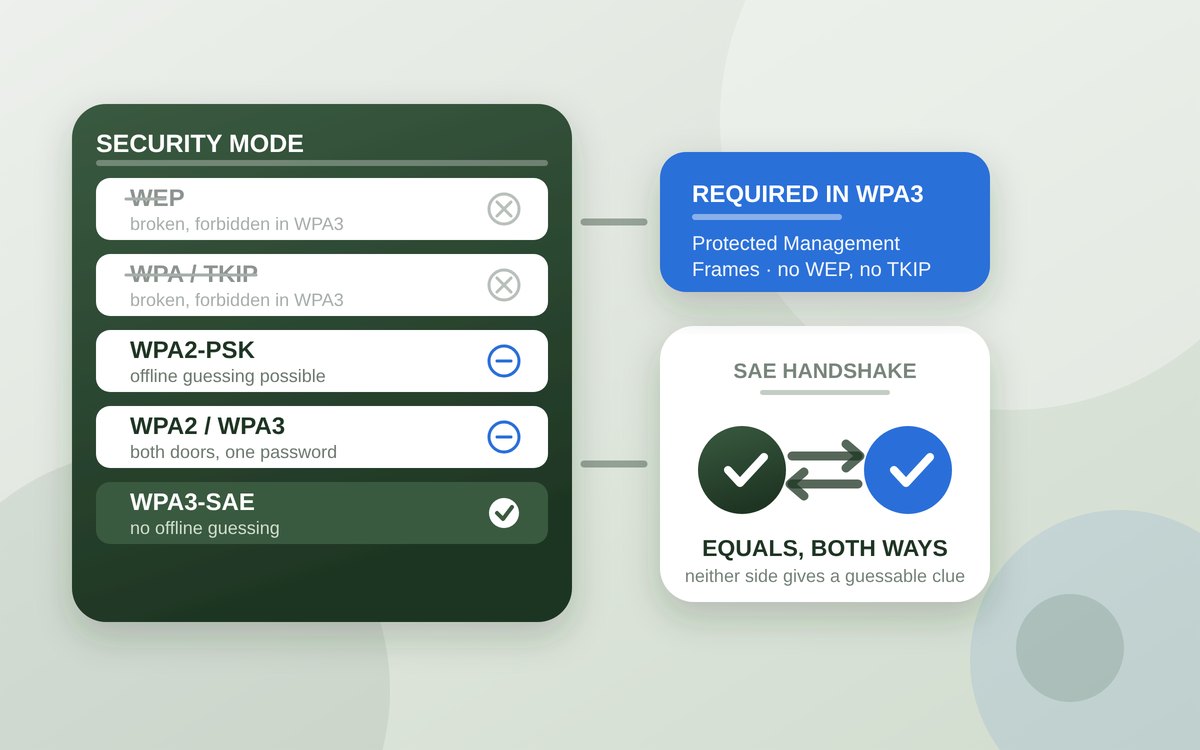
Wi-Fi security has a naming problem. The dropdown offers WPA2-PSK, WPA2/WPA3, WPA3-SAE, sometimes WPA-PSK and, on older hardware, WEP. Four of those five are abbreviations of abbreviations, and routers almost never explain which one your particular collection of devices can actually use. The usual result is that whatever the router shipped with stays selected for the next six years.
What makes this answerable rather than a matter of taste is that the Wi-Fi Alliance publishes the WPA3 specification openly, and separately published a document setting out the known weaknesses of its own design. Between those two papers and the support pages from Apple, Google and Microsoft, it is possible to say precisely what each setting does, what it refuses to do, and which devices will fall off the network if you pick the strictest one. Everything below is drawn from those published documents, linked at the end. Nothing here has been tested on a bench, and no claim is made about any specific router model's firmware.
On this page
What the dropdown is actually selecting
Underneath the friendly names, each entry picks two things: an authentication and key management method — how your device and the access point prove they know the password and agree on encryption keys — and a cipher that encrypts the traffic afterwards. The history of Wi-Fi security is largely the history of the first of those two being broken and replaced.
WEP came first and is comprehensively defeated. WPA, the stopgap that followed, used the TKIP cipher and is also obsolete. WPA2 introduced the AES-based CCMP cipher, which remains sound, paired with a pre-shared-key handshake that does not. WPA3, introduced in 2018, keeps a modern cipher and replaces the handshake.
That distinction matters because it explains why WPA2 is not simply “weak encryption”. The encryption was never the problem. The problem was that WPA2's four-way handshake let anyone within radio range capture enough material to test password guesses offline, at whatever speed their hardware allowed, with no further contact with your network. A short or common passphrase under WPA2 is effectively a published passphrase.
What WPA3 changed
WPA3-Personal replaces the pre-shared-key handshake with Simultaneous Authentication of Equals, or SAE. The practical consequence, in Google's own wording in the Android platform documentation, is that SAE “strengthens protection against offline dictionary attacks”. An eavesdropper who records the exchange cannot take it away and grind through a word list, because the protocol does not hand out anything that can be tested without talking to the access point again. Guessing becomes an online activity, which is slow, rate-limited and noisy.
SAE also gives each session its own keys, so recovering the password later does not retrospectively decrypt traffic that was captured earlier. The Wi-Fi Alliance notes this property explicitly: even where a password is learned, WPA3 clients “keep forward secrecy, so past traffic keys stay protected”.
Two further requirements come bundled. First, WPA3 modes mandate Protected Management Frames, which authenticate the small control messages that clients and access points exchange outside the encrypted data stream — the frames an attacker would otherwise forge to kick a device off the network and force it to reconnect. The Wi-Fi Alliance's security page states flatly that WPA3 networks “require use of Protected Management Frames”. Second, the specification forbids the legacy ciphers outright: no WEP, no TKIP and no WPA version 1 inside any WPA3 mode. Selecting WPA3 is therefore not only an upgrade but a guarantee that nothing can silently negotiate its way down to 2003.
The modes, and what each one forbids
The specification defines several distinct modes, and the differences are stated as hard requirements rather than recommendations.
| Mode | Handshake permitted | Protected Management Frames | Notes |
|---|---|---|---|
| WPA3-Personal Only | SAE only; pre-shared key disallowed | Required | The full benefit of SAE |
| WPA3-Personal Transition | Both pre-shared key and SAE | “Capable”, not required | SAE associations that do not negotiate PMF are rejected |
| WPA3-Personal Compatibility | SAE to aware clients, WPA2 to legacy | Required on 6 GHz | Access-point side only; 2.4 and 5 GHz |
| WPA3-Enterprise Only | 802.1X with SHA-256 | Required | Older 802.1X key management disallowed |
| WPA3-Enterprise 192-bit | Suite B 192-bit only | Required | Client certificates; does not interoperate with other modes |
No household will use the 192-bit enterprise mode, but it is useful context: it requires the GCMP-256 cipher and client certificates, and does not interoperate with the other modes at all. It is for networks where a shared passphrase is not an acceptable concept in the first place.
Keep reading
Transition mode and its documented cost
Transition mode exists because SAE is not backward compatible. A WPA3-only network is simply invisible, in the sense that matters, to a device that cannot speak SAE. So the Wi-Fi Alliance defined a mode in which one network name advertises both handshakes and accepts either, using the same password for both.
This is a genuine compromise rather than a free one, and the clearest statement of why comes from the Wi-Fi Alliance's own WPA3 Security Considerations paper of November 2019. Because the WPA2 side of a transition-mode network uses the same passphrase, an attacker can recover that passphrase with an offline dictionary attack against the WPA2 handshake — either passively, by watching a legacy device connect, or actively, by persuading a WPA3-capable client to downgrade. The Alliance's own assessment is measured: the passive route is “no worse than existing WPA2 risk”, and the active downgrade is “complex and gains little”. But the conclusion is unambiguous — once enough of your devices support WPA3, the document says to disable transition mode so the network gets the full benefit of SAE.
Where transition mode is not good enough but a legacy device genuinely must stay connected, the paper's recommended arrangement is two separate network names with different passwords, on isolated segments. That is more work than a dropdown, but it is the only version of the compromise in which the weak network's password is not also the strong network's password.
One modern refinement is worth knowing about. Android 12 added support for the Transition Disable indication, a signal from the access point telling a client to stop using WPA2 on that network and use WPA3 from then on. Where both ends support it, a network can migrate its clients onto SAE without anyone editing settings.
Advertisement
Where the choice is made for you
Two developments quietly remove the decision. The first is the 6 GHz band. The WPA3 specification does not carry the WPA2-era transition modes into 6 GHz at all: in that band, compatibility mode advertises SAE only, and Protected Management Frames must be required. Any device old enough to need WPA2 is also too old to use 6 GHz, so the band was allowed to start clean. If you run a tri-band router, your 6 GHz network is already WPA3-only whatever the 5 GHz setting says.
The second is Wi-Fi 7. For access points and clients that enable the new multi-link operation, the specification requires the SAE key-management method with group-dependent hashing, the GCMP-256 cipher and Protected Management Frames, and disallows several of the WPA2-era methods. Multi-link operation and WPA2 do not coexist — which is one of the less-discussed reasons a new router may behave differently from the old one. If you are weighing up the generation itself, that sits alongside the questions covered in our guide to whether Wi-Fi 7 is worth it.
Above all of this sits the certification requirement. The Wi-Fi Alliance's security page states that “WPA3 is mandatory for Wi-Fi CERTIFIED devices”. Any router or client that earned the badge in recent years can do WPA3; the question is only whether it is switched on.
What your devices support
Support arrived on the major platforms some years ago, which is the main reason the strict setting is now realistic for most households.
Android added WPA3 and Wi-Fi Enhanced Open in Android 10, and Android 12 added the
Transition Disable indication and Hash-to-Element authentication. Google's platform documentation notes that
on a WPA2/WPA3 transition network, Android 10 and later use WPA3 while Android 9 and earlier use WPA2 —
a neat illustration of what the mixed setting is for. Microsoft says Windows 11 supports WPA3; if you want to
check a specific adapter, running netsh wlan show drivers lists the authentication and cipher
types it supports in infrastructure mode. Apple's guidance is the most directly actionable of the three, and
is quoted in the next section.
The devices that tend to break are not phones or laptops. They are printers, smart plugs, older televisions, cameras, and anything with a cheap Wi-Fi module and no firmware updates since 2019. A sensible migration is to switch to WPA3-only, wait a day, and see what has gone quiet.
The settings that are not security
Two long-standing pieces of folk wisdom survive in router interfaces and in advice columns, and Apple's support page on recommended router settings disposes of both.
On hiding the network name, Apple's instruction is “Set to Disabled”, because “hiding the network name doesn't conceal the network from detection or secure it against unauthorized access” — and a hidden network can in fact leak information identifying you and your networks, since your devices must go looking for it wherever they are. On filtering by MAC address, the instruction is again “Set to Disabled”, with the reasoning that “you shouldn't rely on this feature to prevent unauthorized access to your network”, as MAC addresses can be copied, spoofed or changed.
Both of these cost you convenience and give you nothing. The same page is equally blunt about the settings to avoid altogether — WEP in all its forms, WPA Personal, WPA/WPA2 mixed modes, and “TKIP, including any security setting with TKIP in the name” — and describes open or unsecured networks as “strongly discouraged”, explicitly including guest networks.
Worth separating out: none of this is about what happens to your traffic once it leaves the router. Wi-Fi encryption protects the hop between your device and the access point and nothing beyond it, which is a different job from the one described in our guide to what a VPN actually does.
What to set
Apple's recommendation is the shortest fair summary of the whole question: “Set to WPA3 Personal for better security, or set to WPA2/WPA3 Transitional for compatibility with older devices.” If neither is available on your hardware, WPA2 Personal with AES is acceptable, and AES should be chosen as the cipher wherever a cipher is offered separately.
In order of preference, then. Choose WPA3-Personal only if you can; it is the only setting where SAE's protection is not undercut by a parallel WPA2 door. Choose the transitional setting if something you need still requires WPA2, and treat it as temporary rather than permanent. If a legacy device is going to stay on the network indefinitely, follow the Wi-Fi Alliance's advice and give it its own network name with its own password, so that the password protecting your laptop is not also the password sitting inside a nine-year-old smart plug.
And whichever you pick, the passphrase still matters. SAE's whole contribution is to make guessing slow; it does not make a six-character password sensible, and on a transition-mode network the old offline attack is still available against that same password. A long passphrase remains the cheapest security improvement available on the page.
Sources
- Wi-Fi Alliance — WPA3 Specification v3.5, dated 26 February 2025 (WPA3-Personal uses SAE; WPA3-Personal Only Mode disallows pre-shared-key methods; Protected Management Frames required in Personal Only, Enterprise Only and 192-bit modes and “capable” in transition modes; transition-mode access points reject SAE associations that do not negotiate PMF; compatibility mode advertises SAE only in the 6 GHz band, where PMF must be required; WPA3-Enterprise Only requires 802.1X with SHA-256; 192-bit mode permits only the Suite B method, requires GCMP-256 and client certificates and does not interoperate with other modes; WEP, TKIP and WPA version 1 prohibited in all WPA3 modes; SAE Diffie-Hellman groups limited to 15 to 21; Wi-Fi 7 multi-link operation requires the group-dependent-hash SAE method, GCMP-256 and PMF)
- Wi-Fi Alliance — Security (“WPA3 is mandatory for Wi-Fi CERTIFIED devices”; WPA3 networks disallow outdated legacy protocols and “require use of Protected Management Frames (PMF)”; users of WPA3-Personal “receive increased protections from password guessing attempts”; Wi-Fi Enhanced Open provides unauthenticated data encryption with no public passphrases to maintain)
- Wi-Fi Alliance — WPA3 Security Considerations, November 2019 (transition mode shares one passphrase between WPA2 and WPA3, allowing offline dictionary recovery of the passphrase via a legacy client or an active downgrade; the passive route assessed as no worse than existing WPA2 risk and the active route as complex with little gain; WPA3 clients retain forward secrecy even if the passphrase is learned; recommendation to use separate network names with unique passwords on isolated segments where transition mode is insufficient, and to disable transition mode once enough clients support WPA3; SAE group-downgrade considerations, with only groups 15 to 21 suitable and group 19 mandatory; MODP groups below 3072 bits and groups 22 to 24 to be disabled; security parameter k of at least 40)
- Apple Support — Recommended settings for Wi-Fi routers and access points (“Set to WPA3 Personal for better security, or set to WPA2/WPA3 Transitional for compatibility with older devices”; WPA2 Personal AES acceptable where neither is available; WEP Open, WEP Shared, Dynamic WEP, WPA Personal, WPA/WPA2 mixed modes and “TKIP, including any security setting with TKIP in the name” listed as weak settings to avoid; open and unsecured settings “strongly discouraged” including for guest networks; hidden network “Set to Disabled” because hiding the name “doesn't conceal the network from detection or secure it against unauthorized access”; MAC address filtering “Set to Disabled” because “you shouldn't rely on this feature to prevent unauthorized access to your network”)
- Android Open Source Project — WPA3 and Wi-Fi Enhanced Open (Android 10 added WPA3 and Wi-Fi Enhanced Open support; SAE used in place of a pre-shared key, strengthening protection against offline dictionary attacks; Android 12 added the Transition Disable indication and Hash-to-Element authentication; on a WPA2/WPA3 transition network, Android 10 and later use WPA3 while Android 9 and earlier use WPA2; WPA3 and Wi-Fi Enhanced Open supported in client mode only)
- Microsoft Support — Faster and more secure Wi-Fi in Windows (Windows 11 supports the latest Wi-Fi Alliance standards including WPA3, described as improving authentication and cryptographic strength; Wi-Fi 7 requires Windows 11 version 24H2; Wi-Fi 7 Enterprise not currently supported; adapter capabilities visible via
netsh wlan show drivers)