Mesh Wi-Fi vs a range extender: what actually fixes a dead spot
Both put a second radio in the hallway. One of them repeats every packet twice on the same channel and leaves your phone to work out what to do; the other has a controller, a plan, and a published specification behind it. The difference shows up in the one number nobody prints on the box.
The back bedroom has one bar. Two options sit on the same shelf: a plug-in range extender for £30, or a two-pack mesh system for £130. Both promise to eliminate dead spots, and neither mentions the thing that decides whether it will.
That thing is the backhaul — the link carrying traffic from the second box back to your router. Get the backhaul right and a cheap extender can be perfectly adequate. Get it wrong and an expensive mesh system will be slower in the hallway than the router was on its own. Everything else in this comparison is downstream of that one question.
On this page
- The short answer
- What a dead spot actually is
- The repeater and the airtime it spends twice
- What “mesh” adds: a controller
- Why your phone refuses to let go
- The backhaul decides everything
- Placement, and the halfway rule
- EasyMesh, OneMesh and the walled gardens
- Which one fixes which problem
- What Wi-Fi 8 changes
The short answer
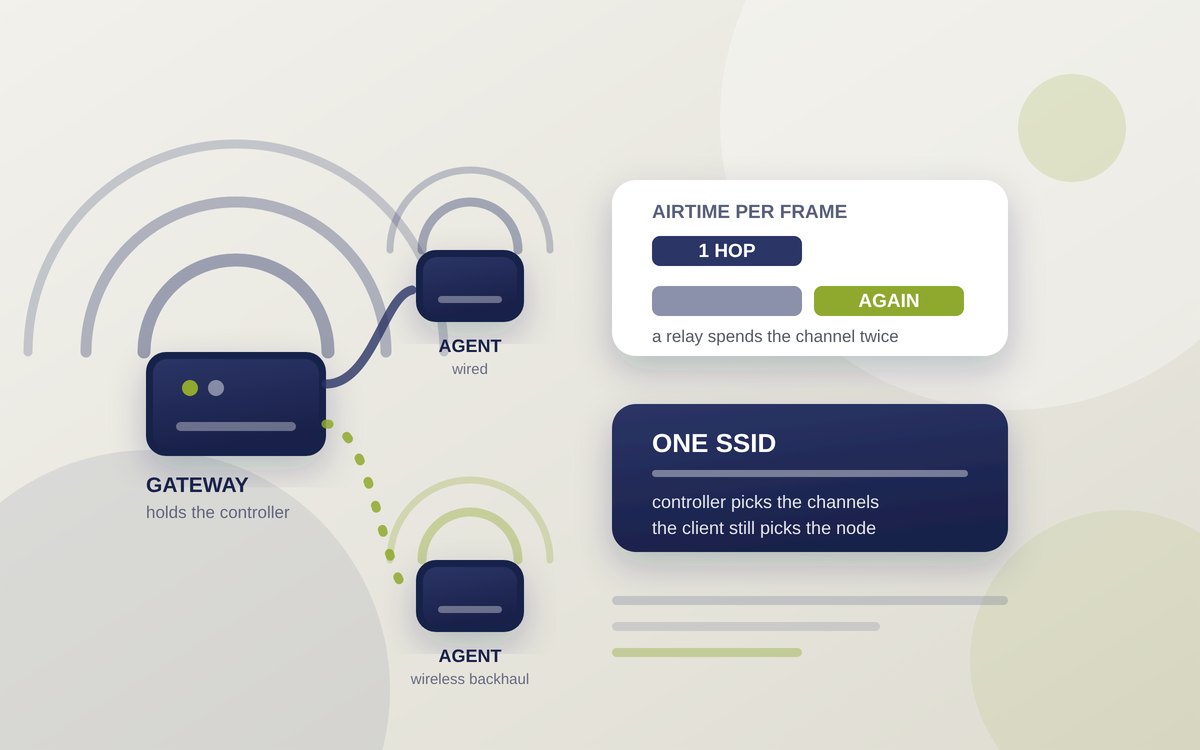
- A range extender relays. It receives a frame and sends it on. Wi-Fi is half duplex, so a relay on a single radio cannot listen and talk at once — it must store and forward, spending roughly twice the airtime for the same data.
- A mesh system coordinates. The Wi-Fi Alliance's EasyMesh specification defines a controller and one or more agents: the controller picks channels, decides which access point each device should use, and steers it there.
- Neither can force your phone to move. Roaming is a client decision. The network can only suggest, using the 802.11k, 802.11v and 802.11r amendments.
- A cable beats both. An Ethernet run to the second node removes the relay penalty entirely, which is why every mesh vendor quietly recommends one.
- Buy on backhaul, not on brand. A dedicated backhaul radio or a wired link is the feature that matters; the mesh logo is the feature that gets advertised.
What a dead spot actually is
“No signal” is rarely the problem. Far more often the signal arrives but arrives badly, and the two failures want different fixes.
The first is simple attenuation: brick, concrete, foil-backed insulation and water all absorb 2.4 and 5 GHz energy, and Ofcom's own advice to households lists halogen lamps, dimmer switches, speakers, baby monitors and microwaves among the things that interfere. Signal strength, measured as RSSI in negative decibel-milliwatts, falls as you walk away. More radios closer to you genuinely helps.
The second is contention. Neighbouring networks share the same channels, and Wi-Fi is a queue-based medium: every device waits for a clear moment to transmit. A flat with thirty visible networks can show four bars and still stall, because the air is busy rather than weak. Another radio on the same channel makes that worse — the first way an extender can backfire.
So work out which you have before buying anything. Strong signal with slow speeds is contention; weak signal past a certain wall is attenuation. Only the second is a coverage problem.
The repeater and the airtime it spends twice
A classic range extender joins your network as a client, then re-broadcasts it as an access point. The mechanism is a relay, and relays on a shared half-duplex medium carry an unavoidable cost. As the description of wireless distribution systems puts it, Wi-Fi “is an inherently half duplex medium and therefore any Wi-Fi device functioning as a repeater must use the Store and forward method of communication”. The extender cannot receive from the router and transmit to your laptop simultaneously on the same channel. It receives, then it sends.
Every frame therefore occupies the channel twice: router to extender, then extender to laptop. The ceiling behind a single-radio extender is about half of what the extender itself manages back to the router — and that link is already degraded, because the extender sits where the signal was getting thin.
Two irritations follow. Many extenders publish a second network name — the familiar
MyWiFi_EXT — so devices treat it as a separate network and cling to whichever they joined
first. And because the 4-address frame format that makes transparent relaying possible was never standardised
into interoperable products, mixing vendors has historically been a lottery.
Keep reading
What “mesh” adds: a controller
Mesh is not a different radio technology. The frames are ordinary Wi-Fi. What a mesh system adds is management, and since 2018 that management has had a published specification: Wi-Fi CERTIFIED EasyMesh, announced by the Wi-Fi Alliance in May that year and extended in October 2021 to cover Wi-Fi 6 and 6E.
EasyMesh describes a Multi-AP architecture with two roles. The controller is, in the Alliance's words, a “logical entity that can be located in a single device anywhere in the network”, usually the gateway; it onboards and manages the other access points. Each of those is an agent, which “execute[s] commands from the controller and report[s] measurements and capabilities to the controller and other APs”.
That reporting is the point. Knowing the whole network's state, the controller can select “the best path, band, and channels for backhaul connections between APs”, request channel scans, set per-radio channel and transmit-power preferences, and perform client steering — sending messages to “steer, or suggest, a client move its connection from one AP to another”. Onboarding is standardised too: push button, Wi-Fi Easy Connect QR code, or Ethernet, with a zero-touch option for pre-provisioned nodes.
Why your phone refuses to let go
Here is the part that surprises people who have just spent £300: the mesh system cannot make your laptop change access point. Roaming is decided by the client. The network's three tools, all IEEE amendments, only inform and encourage it.
802.11k supplies neighbour reports, so a client that has associated with a capable access point can be handed a list of nearby candidates instead of scanning blindly for them. 802.11v adds BSS Transition Management, letting the infrastructure send a request recommending a specific access point — but, as Cisco's deployment documentation states flatly, “the client can honor the suggestion or discard it”. 802.11r, published in 2008, makes the move itself cheap by pre-establishing the encryption keys with the target access point before the client roams, so the handover does not require a full security handshake.
What the client does with all this is set by the client's own firmware, and Apple publishes its thresholds, which makes them worth quoting as a concrete example. Apple states that devices evaluate roaming by watching RSSI, and gives the trigger as −75 dBm on Macs and −70 dBm on iPhone and iPad. Past that point a candidate access point still has to be clearly better: 8 dB stronger while transmitting data or 12 dB stronger when idle on iOS and iPadOS, and consistently 12 dB stronger on macOS. Apple also notes that Intel-based Macs support none of 802.11k, r or v.
Those margins explain the familiar complaint. Walking to the bedroom, your phone holds the kitchen access point long after the bedroom one is nearer, because “nearer” is not the test — “12 dB better” is. A controller can nudge that decision with 802.11v hints; it cannot overrule it, and no money spent will make a client that lacks these amendments behave like one that has them.
Advertisement
The backhaul decides everything
There are only three ways to get traffic from the second box to the first, and they differ by an order of magnitude in what they cost you.
Shared wireless. The node talks to clients and to the router on the same radio. This is the cheap extender, and the dual-band mesh two-pack. You pay the store-and-forward penalty.
Dedicated wireless. A third radio is reserved for node-to-node traffic. Netgear describes its tri-band Orbi design as using a “dedicated 5 GHz link for your Orbi router and satellites to communicate with one another”, which is what lets it claim the same speeds across the coverage area. The backhaul still travels through your walls, but it no longer competes with your devices for airtime.
Wired. Run Ethernet and the penalty disappears: the second node's radio is entirely its own. The vendors say so plainly. eero's documentation notes its units can use Ethernet backhaul to “maximize your internet speeds and reduce wireless interference”, recommending Cat5e, Cat6 or Cat6a and either a switch or a daisy chain — while warning that its Beacons and 6 Extenders have no Ethernet ports. EasyMesh supports wired and Wi-Fi links alike, noting that “fronthaul and backhaul links may use separate radios for better performance”. Ofcom's household advice makes the same point more simply: a cable is faster and steadier, for very little money.
| Backhaul | Typical product | Airtime cost | Worth it when |
|---|---|---|---|
| Shared wireless, single radio | Plug-in extender, £20–40 | Roughly halves throughput behind the node | You need coverage, not speed: a doorbell, a thermostat, email in the shed |
| Shared wireless, dual band | Dual-band mesh two-pack | Significant, but the controller can pick the better band | One awkward room, and running a cable is impossible |
| Dedicated wireless band | Tri-band mesh | Backhaul no longer competes with clients | Several rooms to cover and real speeds needed in all of them |
| Ethernet | Any mesh node or access point with a LAN port | None | Always, if the cable can be run — this is the actual fix |
| Powerline or coax adapters | Hybrid kits | Varies hugely with house wiring | A cable is impossible but a socket on the same circuit is not |
Placement, and the halfway rule
A node placed where the signal is already poor inherits that poor signal and then shares it. Google's documentation for its own Wifi hardware gives the rule plainly: put the point “about halfway in that direction, but no more than 2 rooms away from your router or another point”, keep devices “off the ground and in plain view, like on a shelf”, and note that “points perform better when they can see each other”. Google also publishes a ceiling of “a maximum of 5 Wifi devices in a single network”, and rates one Nest Wifi Pro router at up to 2,200 square feet.
There is research pointing the same way with numbers attached. A study by researchers at Universitat Pompeu Fabra and FON Labs, modelling and then testing home networks with extenders, found the best placements put the extender where it sees the access point at roughly −50 to −72 dBm. The same paper adds a more interesting point: picking an access point on signal strength alone is wasteful, and a rule that also weighs how busy each one's channel is raised total measured throughput in their testbed by about 77 %. Those are their figures, from their testbed, not ours — but they are what the controller model is designed to exploit.
Two practical consequences. First, “halfway” beats “in the dead spot”, always. Second, more nodes is not better: each one is another radio competing for the same air, and another device drawing power around the clock, which is not nothing when you look at what gadgets cost sitting idle.
EasyMesh, OneMesh and the walled gardens
Three kinds of product carry the word mesh. EasyMesh is the Wi-Fi Alliance certification, and the only one that is cross-vendor by design — the Alliance's stated aim is “deploying adaptable networks comprised of multiple access points from different vendors”. Vendor schemes such as TP-Link's OneMesh are closed to one brand, as are the well-known systems from eero, Google and Netgear, which TP-Link's own comparison describes as “closed ecosystems” where “devices only work with other devices from the same brand”.
Certification is a floor rather than a guarantee of equivalence, and TP-Link is refreshingly blunt about the gap: “cross-brand EasyMesh setups work, but same-brand setups tend to perform better”. Treat EasyMesh as insurance — it means a node bought in three years will probably still join, which a proprietary system cannot promise — rather than as a reason to deliberately mix brands.
EasyMesh also accommodates mixed generations, listing Wi-Fi 4 and 6 on 2.4 GHz, Wi-Fi 4, 5 and 6 on 5 GHz, and Wi-Fi 6E and 7 on 6 GHz — so an older node will not hold back a newer one on another band. That matters if you are weighing whether Wi-Fi 7 is worth it for a house you intend to upgrade piecemeal.
Which one fixes which problem
| The symptom | What to buy | Why |
|---|---|---|
| One room with no usable signal; low-bandwidth devices only | A single extender, placed halfway | Coverage is the requirement; halved throughput is irrelevant to a sensor |
| A whole floor or an extension that is weak throughout | Mesh, tri-band if wireless | Multiple nodes need coordinated channels and steering, not three competing networks |
| Signal drops as you walk between rooms on a call | Mesh with single SSID and 802.11k, v, r support | The handover, not the coverage, is what is failing |
| Four bars everywhere but everything is slow | Neither — look at channels and congestion | Contention, not coverage; another radio makes it worse |
| Fast router, slow Wi-Fi, cable route available | A wired access point or wired mesh node | Removes the relay penalty completely for the price of a cable |
| Devices cling to the wrong node after you have added one | Nothing — check client support first | Roaming is the client's decision; older hardware may lack the amendments |
What Wi-Fi 8 changes
Everything above shares a limitation: access points coordinate through a controller that configures them, but they do not coordinate their actual transmissions. That is the headline change in IEEE 802.11bn, the amendment behind Wi-Fi 8, under the name Multi-AP Coordination — access points cooperating over the air through coordinated spatial reuse, coordinated beamforming and coordinated time division. A 2026 tutorial on the draft by researchers at Universitat Pompeu Fabra, Nokia Bell Labs and others reports a target of at least 25 % improvement in throughput, worst-case latency and frame loss against Wi-Fi 7. It is a draft, and draft targets are aspirations rather than results.
Which is a reason to buy for the house you have rather than the standard you are promised. The cheapest meaningful upgrade to home Wi-Fi has been the same for twenty years and is not a logo: put the second radio halfway, and if you possibly can, give it a cable.
Sources
- Wi-Fi Alliance — Wi-Fi CERTIFIED EasyMesh Technology Overview, January 2024 (controller and agent roles; client steering; backhaul path, band and channel selection; onboarding and zero-touch configuration; supported Wi-Fi generations per band)
- Wi-Fi Alliance — Wi-Fi CERTIFIED EasyMesh delivers intelligent Wi-Fi networks, 14 May 2018 (programme launch; self-organisation; multi-vendor aim)
- Wi-Fi Alliance — EasyMesh enhances Wi-Fi performance in multiple AP networks, 7 October 2021 (Wi-Fi 6 and 6E integration; 6 GHz and 160 MHz channels)
- Apple — Wi-Fi roaming support in Apple devices (802.11k, r, v and 802.11u support by model; RSSI roam triggers of −70 dBm on iPhone and iPad and −75 dBm on Mac; 8 dB and 12 dB candidate margins; Intel-based Macs lack 11k, 11r and 11v)
- Cisco — Understand 802.11r, 11k and 11v fast roams on 9800 WLCs (neighbour reports; BSS Transition Management and BSS Max Idle; pre-established keys; the client may honour or discard a steering request)
- IEEE 802.11r-2008, Fast BSS Transition (published 15 July 2008; security key negotiation redefined so keys are established before the transition)
- Wireless distribution system (Wi-Fi as an inherently half-duplex medium; repeaters must store and forward; the 4-address frame format of IEEE 802.11-1999 was never standardised into interoperable products)
- Netgear — how Orbi uses tri-band Wi-Fi (the third band as a dedicated 5 GHz router-to-satellite link)
- eero — can I connect my eeros with Ethernet (Ethernet backhaul to maximise speeds and reduce interference; Cat5e, Cat6 or Cat6a; switch or daisy chain; Beacons and 6 Extenders have no Ethernet ports)
- Google — where to place your Wifi devices (halfway, no more than two rooms away; off the ground and in plain view; line of sight between points)
- Google — how many routers or points do I need (up to 2,200 sq ft per Nest Wifi Pro router; points two to three rooms apart; maximum of five Wifi devices per network)
- Ofcom — staying connected to your broadband (router placement off the floor; interference from halogen lamps, dimmer switches, speakers, baby monitors and microwaves; wired Ethernet for speed and stability)
- TP-Link — EasyMesh, OneMesh and proprietary mesh (EasyMesh as an open Wi-Fi Alliance standard; OneMesh and rival systems as closed ecosystems; cross-brand setups work but same-brand tends to perform better)
- Adame, Carrascosa, Bellalta (Universitat Pompeu Fabra), Pretel and Etxebarria (FON Labs) — channel-load-aware AP and extender selection in home Wi-Fi networks (best extender placement at roughly −50 to −72 dBm from the AP; total measured throughput raised by about 77 % over RSSI-based selection in their testbed)
- Wilhelmi, Bellalta, Kijanka et al. — a tutorial on IEEE 802.11bn Multi-AP Coordination for Wi-Fi 8 (Co-SR, Co-BF, Co-TDMA, Co-RTWT and Co-CR in Draft 1.4; stated target of at least 25 % improvement over 802.11be)