Passkeys explained: signing in without a password
Somewhere in the last two years your phone started interrupting sign-ins to offer you a passkey, and the explanation it gave was almost certainly “simpler and more secure”. That is true and entirely unhelpful. The useful version is a single structural fact: a passkey is not a secret you hand over, and almost everything else follows from that.
Passwords have one unavoidable property: to prove you know yours, you have to send it somewhere. Every weakness people spend their lives working around — reuse, phishing pages, breached databases — follows from that single design decision. A shared secret can be captured in transit, stolen at rest, or talked out of you by a convincing email.
A passkey replaces the shared secret with a pair of mathematically related keys. The site keeps one half, your device keeps the other, and the half the site keeps is useless to anyone who steals it. What follows is what that change does and does not buy you, assembled from the published specifications and the support documentation of the companies implementing them, all linked at the end. Nothing here was tested on a bench, and no claim is made about any individual service's implementation quality.
On this page
What a passkey actually is
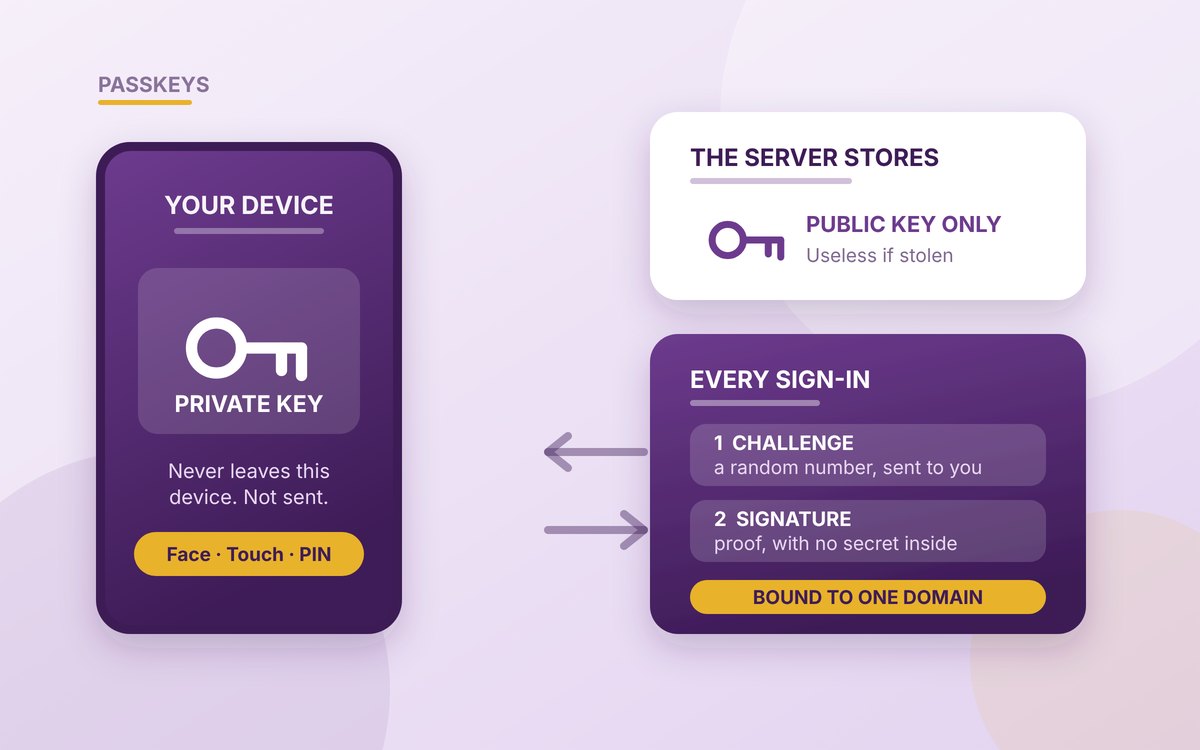
The FIDO Alliance, which publishes the standards involved, defines a passkey as “an authentication credential based on FIDO standards”. Underneath, it is a key pair generated on your device, one pair per account. The public key goes to the service and is stored in its database. The private key stays with you. Apple's documentation is explicit that “the private key never leaves the user's devices”.
When you sign in, the service sends a random challenge. Your device signs that challenge with the private key and returns the signature; the service checks it against the public key it already holds. Nothing secret crosses the network, in either direction, ever.
The fingerprint or face scan is often mistaken for the credential itself. It is not. It is the local gate authorising your device to use the private key, which is why a screen-lock PIN works just as well. Both Apple and Google state that biometric data stays on the device; the service receives only the signature.
The most immediate consequence is on the service's side. A breached password database is a catastrophe because it holds material that can be cracked and reused. A breached passkey database holds public keys, which are designed to be public. As FIDO puts it, with no shared secret stored on the server, a breach yields no passwords to steal.
Why phishing stops working
The second property is the one security people care about most. When a passkey is created it is bound to the domain that created it, so a passkey made for your bank will not produce a signature for a lookalike domain, however perfect the copy or persuasive the email. The browser does not even offer it, because from its point of view the site asking is a different site.
This is the difference between a passkey and the second factors most people have been told to use. In a blog post of 23 April 2026, announced at CYBERUK 2026, the UK's National Cyber Security Centre stated its position plainly: all traditional multi-factor methods — SMS, email, app-generated codes, physical tokens and push approvals — are “inherently phishable”, because a person can be talked into relaying any of them to the wrong party. A passkey cannot be relayed.
The NCSC assesses FIDO2 credentials, passkeys included, as “as secure or more secure than traditional MFA” against the attacks actually seen in the wild, and judges large-scale attacks on correctly implemented passkeys unlikely, because the cheap reuse and relaying of credentials has been removed. Its recommendation: use passkeys wherever a service offers them, with two-step verification as the fallback where it does not.
| Sign-in method | Can be phished or relayed? | Useful to a database thief? |
|---|---|---|
| Password alone | Yes | Yes — crackable and reusable |
| Password + SMS code | Yes — NCSC: inherently phishable | Partly |
| Password + authenticator app code | Yes — NCSC: inherently phishable | Partly |
| Password + push approval | Yes — NCSC: inherently phishable | Partly |
| Passkey (synced) | No — bound to the domain | No — public key only |
| Passkey on a security key | No — bound to the domain | No — public key only |
Phishability classification per the NCSC's April 2026 position; FIDO notes that phishing resistance applies whether or not the credential is hardware-bound.
Keep reading
Synced passkeys and device-bound passkeys
FIDO documents two flavours, and the distinction matters more than the marketing suggests.
Synced passkeys are held by a passkey provider — a built-in credential manager or a third-party app — and copied between your devices, with FIDO stating that the syncing is end-to-end encrypted. This is the default most people get, and it is what makes passkeys survivable: a new phone inherits them.
Device-bound passkeys never leave the one device, including those on a FIDO security key. FIDO describes these as offering the highest assurance, which is the polite way of saying that if the device goes, the credential goes with it and recovery becomes the service's problem.
Since WebAuthn Level 3, a site can tell which it is dealing with: the Backup Eligible and Backup State flags report whether a credential is synced or device-bound, and whether it is currently backed up. That is why a bank may accept a synced passkey for sign-in but insist on a hardware key for high-value actions.
Advertisement
What each platform requires
Google's help page is the most specific published list of requirements. It gives Windows 10, macOS Ventura or ChromeOS 109 and later for computers; Android 9 or iOS 16 and later for phones; a FIDO2-capable security key; and Chrome 109, Safari 16, Edge 109 or Firefox 122 as the browser floor. Before setup, the phone's screen lock must be on, Apple devices need iCloud Keychain, and Bluetooth has to be on to use a phone's passkey on another computer.
Apple's requirement is stricter in one specific way: any Apple Account using iCloud Keychain must have two-factor authentication, and attempting to register a passkey without it prompts you to set it up first. Keychain data is end-to-end encrypted with keys Apple states it does not hold, and brute-force attempts against the escrow are rate-limited even from a privileged position on Apple's own backend.
On Windows, passkeys are no longer confined to the built-in manager: Microsoft's Windows IT Pro blog post “Windows 11 expands passkey manager support”, last updated in November 2025, documents native support for third-party passkey managers — which is what makes a cross-platform manager practical if you mix Windows with iOS, or Android with macOS.
| Platform | Minimum version (per Google's documentation) |
|---|---|
| Windows | Windows 10 or later |
| macOS | macOS Ventura or later |
| ChromeOS | ChromeOS 109 or later |
| Android | Android 9 or later |
| iPhone / iPad | iOS 16 or later, with iCloud Keychain on |
| Browsers | Chrome 109, Safari 16, Edge 109 or Firefox 122 |
| Security keys | Any key supporting FIDO2 |
Using your phone to sign in elsewhere
The question that stops most people adopting passkeys is what happens on a computer that is not theirs. The answer is a cross-device flow better designed than it sounds. You enter your username, choose the passkey option, and the computer shows a QR code; you scan it with the phone holding the passkey and approve with a fingerprint, face or PIN. FIDO notes that this flow uses Bluetooth Low Energy proximity checks as well as the QR code, so the phone has to actually be near the computer — which is what stops someone emailing you a QR code and collecting a sign-in. Nothing is left behind on the borrowed machine: the passkey stays on the phone and only a session is created.
Losing the device
With synced passkeys, a single lost device is a non-event: the credentials are on your other devices, and on a replacement as soon as it joins your account. Apple's documented position is that syncing means you keep your passkeys if one device is lost, and that if all your devices are lost, passkeys can be recovered through iCloud Keychain escrow.
That recovery path is worth understanding, because it is where the security of the whole arrangement actually sits. Apple describes authenticating with your iCloud account and password, responding to a text sent to your registered number, and entering your device passcode; up to ten attempts are allowed, the record locks after several failures until you contact Apple Support, and after the tenth failure the escrow record is destroyed. An account recovery contact can be nominated as well.
Google's side is more about revocation: a passkey you created is removed from “Passkeys and security keys” in your security settings, one an Android device created automatically is removed by signing that device out under “Manage all devices”, and if prompts persist afterwards the leftover copy is in a third-party credential manager. For a lost or stolen device, you sign in elsewhere and remove its passkey.
If the lost device is a phone you intend to replace or sell, revoking its passkeys belongs on the same checklist as everything in our guide to wiping and selling an old phone.
Moving passkeys between managers
For a long time the honest objection to passkeys was lock-in: a credential you cannot export is a credential your platform vendor controls. The FIDO Alliance has addressed this with the Credential Exchange Protocol, published as a working draft dated 3 October 2024 and described as “a protocol to securely move one or more credentials between two credential providers”, on the same or different devices.
It is deliberately not a CSV export. The draft uses a Diffie-Hellman key exchange to establish a secure channel, has the importer issue a challenge that the exporter signs and the importer validates before anything is decrypted, and encrypts the archive using the HPKE parameters of RFC 9180. It is candid about its limits: it does not address threats from the credential providers themselves, and it carries the standard warning that it “is not intended to be a basis for any implementations as the Specification may change”. Treat portability as arriving rather than arrived, and check whether your manager supports it before relying on it.
What passkeys do not fix
Three things, which together are why a passkey is not a reason to stop paying attention.
Recovery is still the weak point. A phishing-resistant credential is only as strong as whatever gets you back in when you lose it, and that path usually runs through an email address, a phone number or a support agent. The NCSC names the sync account's authentication strength as the key control and asks services for clear credential management and recovery options. If your recovery still ends at an SMS code, that is where an attacker will aim.
The password is usually still there. Google is explicit that creating a passkey does not remove your existing sign-in or recovery methods, and that a passkey can serve as a second step if you have 2-Step Verification. Convenience improves immediately; the attack surface only shrinks when you actually remove the password, which many services still do not allow.
Coverage is patchy. A 2024 survey commissioned by the FIDO Alliance found 53% of respondents had enabled passkeys on at least one account, while only 22% had enabled them everywhere they could — mostly a statement about how many services offer them. Vendor-reported gains are striking, such as Amazon's sign-ins being six times faster and Google's four times more successful than with passwords, but FIDO publishes those figures without independently verifying them, and so do we.
And a passkey protects the act of signing in, nothing more. It says nothing about what a service does with your data afterwards, or about the network path your traffic takes — a separate question covered in our guide to what a VPN actually does.
What to do about it
The standard underneath all of this stopped moving on 25 August 2026, when the W3C published WebAuthn
Level 3 as a Recommendation — Level 2 having reached that status in 2021 and Level 1 in 2019. Level 3
added passkey autofill through conditional mediation, the quiet upgrade of password users to passkeys during
sign-in, the backup flags above, a Signals API letting a site tell your credential manager that a passkey has
been revoked or renamed, and Related Origin Requests, which allow one passkey to work across related domains
the site lists at /.well-known/webauthn. Most of it shipped in browsers first.
Practically: create passkeys on the accounts that matter most, starting with the email account that can reset everything else. Keep the password in your manager rather than deleting it, until the service genuinely supports passkey-only sign-in. Check that your account recovery does not depend on something weaker than the passkey you just made. For an account worth more than the rest, a device-bound passkey on a hardware key is the version with no sync account behind it. And if you live in two ecosystems, pick a credential manager that works in both.
None of that is a dramatic change in routine. The dramatic change already happened, quietly, in the shape of the credential: for the first time in consumer sign-in, the thing proving who you are is not a thing you can be tricked into handing over.
Sources
- FIDO Alliance — Passkeys (a passkey is “an authentication credential based on FIDO standards”; public-key cryptography replaces passwords; the private key stays on the device and biometric data never leaves it; no shared secret on the server, so a database breach yields no passwords to steal; synced passkeys stored and synced through a passkey provider with end-to-end encrypted syncing; device-bound passkeys never leave a single device, including FIDO security keys, and offer the highest assurance; phishing resistance applies whether or not keys are hardware-bound; cross-device sign-in uses a QR code with Bluetooth Low Energy proximity checks; 2024 commissioned survey — 53% had enabled passkeys on at least one account and 22% on every account they could; vendor-reported 6x faster sign-in at Amazon and 4x higher sign-in success at Google, not independently verified by FIDO)
- Apple Support — About the security of passkeys (built on WebAuthn public-key cryptography; a unique key pair per account, with the private key never leaving the user's devices; “Passkeys sync across a user's devices using iCloud Keychain”; Keychain data end-to-end encrypted with keys Apple does not know, with rate-limited brute-force protection even from a privileged backend position; iCloud Keychain requires two-factor authentication, and registering a passkey without it prompts setup; a lost single device does not lose passkeys, and escrow recovery covers the loss of all devices; recovery requires the iCloud password, a text to the registered number and the device passcode, with up to ten attempts, locking after several failures and destruction of the escrow record after the tenth; optional account recovery contact)
- Google Account Help — Sign in with a passkey instead of a password (“Unlike passwords, passkeys can't be shared, copied, written down, or accidentally given to someone else”; biometric data stays on the device; requirements of Windows 10, macOS Ventura or ChromeOS 109+, Android 9 or iOS 16+, a FIDO2 security key, and Chrome 109+, Safari 16+, Edge 109+ or Firefox 122+; screen lock required, iCloud Keychain required on Apple devices, Bluetooth required for cross-device use; cross-device sign-in via QR code scanned by the phone; creating a passkey does not remove existing sign-in or recovery methods, and a passkey can act as a second step with 2-Step Verification; removal via Passkeys and security keys, via Manage all devices for automatically created Android passkeys, and from a third-party credential manager if prompts persist)
- National Cyber Security Centre — Passkeys are more secure than traditional ways to log in, 23 April 2026, announced at CYBERUK 2026 (FIDO2 credentials including passkeys assessed as “as secure or more secure than traditional MFA” against attacks seen in the wild; all traditional MFA methods — SMS, email, app-generated codes, physical tokens, push approvals — described as “inherently phishable”; passkeys cryptographically bind authentication to the legitimate service; large-scale attacks on correctly implemented passkeys considered unlikely because cheap credential reuse and relaying is removed; the strength of the authentication protecting the sync account named as the key control; services asked to provide clear credential management and recovery options; traditional 2SV “remains an important fallback” where passkeys are unsupported)
- FIDO Alliance — Credential Exchange Protocol, Working Draft, 3 October 2024 (“a protocol to securely move one or more credentials between two credential providers”, on the same or different devices; motivated by insecure export formats such as CSV; Diffie-Hellman key exchange to create a secure channel, importer challenge signed by the exporter and validated before decryption, credential data encrypted with the HPKE parameters of RFC 9180 and each archive file encrypted as a JSON Web Encryption file; does not address threats from the credential providers themselves; and the draft warning that it “is not intended to be a basis for any implementations as the Specification may change”)
- FIDO Alliance — WebAuthn Level 3 is now a W3C Recommendation (published as a W3C Recommendation on 25 August 2026, with Level 2 reaching that status in 2021 and Level 1 in 2019; Level 3 adds conditional mediation for passkey autofill and quiet upgrade of password users, the Backup Eligible and Backup State flags distinguishing synced from device-bound credentials, a Signals API for one-way updates to credential managers about revoked, stale or renamed credentials, AAGUID without attestation, client hints, Related Origin Requests using an allowed-origins list at
/.well-known/webauthn, and the PRF extension; most features already implemented across major platforms before Recommendation status) - Microsoft — Windows IT Pro Blog: Windows 11 expands passkey manager support, last updated 11 November 2025 (native support for third-party passkey managers in Windows 11)