How much broadband speed do you actually need?
Everybody selling you broadband quotes a download figure, and almost nobody explains what would consume it. The services that actually use your line publish their own requirements, and those numbers are far smaller than the ones on the tariff card. The useful question is not how fast your connection is, but how many things can want it at once.
There is an odd asymmetry in how home broadband gets sold. The headline number is a download speed, usually expressed in megabits per second, and it is the only figure given any prominence. Yet every service that will eventually consume that line — the streaming platforms, the video-call software, the game stores — publishes its own bandwidth requirement, and those published requirements have barely moved in a decade. A 4K film still asks for around fifteen to twenty megabits. A video call still asks for about four. Meanwhile the tariffs on sale have gone from tens of megabits to a gigabit and beyond.
Somewhere in that gap sits the actual answer, and it is not a single number. It depends on how many demands overlap at your busiest moment, on which direction those demands run, and on a set of bottlenecks between the socket and the screen that no tariff controls. This guide works through all three using published figures only: regulatory benchmarks, vendor support pages and national coverage data. Nothing here has been measured on a test bench, and every figure is attributed to the organisation that published it, with links at the end.
On this page
What the regulators call enough
Three authorities have put a number on an adequate connection, and the spread between them is instructive.
In the United Kingdom, the broadband universal service obligation defines a decent connection as one offering at least 10 Mbit/s download and 1 Mbit/s upload. Ofcom's Connected Nations UK report for 2025 records that around 340,000 premises — one per cent of the total — cannot get that over a fixed line, falling to roughly 44,000 premises, or 0.1 per cent, once fixed wireless access is counted.
In the United States, the Federal Communications Commission raised its fixed benchmark in its 2024 Section 706 report from 25/3 to 100 Mbit/s download and 20 Mbit/s upload, and set a separate long-term goal of 1 Gbit/s down paired with 500 Mbit/s up. The ratio matters as much as the headline: the FCC's benchmark reserves a fifth of the capacity for the upstream direction, where the UK obligation reserves a tenth.
The European Union does not set a household adequacy figure in the same way; it sets an infrastructure target. Decision (EU) 2022/2481, the Digital Decade Policy Programme, requires that by 2030 “all end users at a fixed location are covered by a gigabit network up to the network termination point”, with all populated areas covered by wireless networks performing at least equivalently to 5G. That is a statement about what should be available, not about what a household needs to buy.
Taken together: ten megabits is the floor below which a connection is considered deficient, a hundred is the figure a regulator now treats as properly modern, and a gigabit is a policy ambition for the infrastructure rather than a description of demand.
What each activity actually asks for
Netflix's help centre gives three download figures: 3 Mbit/s or higher for HD at 720p, 5 Mbit/s or higher for Full HD at 1080p, and 15 Mbit/s or higher for Ultra HD. YouTube's recommendations are shaped the same way and reach slightly higher at the top: approximately 20 Mbit/s for 4K, 5 Mbit/s for 1080p, 2.5 Mbit/s for 720p, 1.1 Mbit/s for 480p and 0.7 Mbit/s for 360p.
Video calling is cheaper than most people assume. Zoom's documentation puts a one-to-one 720p call at 1.2 Mbit/s in each direction and a 1080p call at 3.8 Mbit/s up and 3.0 Mbit/s down; a 720p group call sits at 2.6 Mbit/s up and 1.8 Mbit/s down. Screen sharing without a video thumbnail is listed at 50 to 75 kbit/s — a rounding error. Microsoft gives comparable figures for Teams: audio recommended at 58 kbit/s in each direction, video meetings recommended at 2.5 Mbit/s up and 4 Mbit/s down, with a stated minimum as low as 150 kbit/s up and 200 kbit/s down.
| Activity | Published download | Published upload | Source |
|---|---|---|---|
| Netflix, HD 720p | 3 Mbit/s | — | Netflix help centre |
| Netflix, Full HD 1080p | 5 Mbit/s | — | Netflix help centre |
| Netflix, Ultra HD | 15 Mbit/s | — | Netflix help centre |
| YouTube, 4K | 20 Mbit/s | — | YouTube Help |
| Zoom, 1080p group call | 3.0 Mbit/s | 3.8 Mbit/s | Zoom support |
| Zoom, screen share only | 50–75 kbit/s | 50–75 kbit/s | Zoom support |
| Teams, video meeting (recommended) | 4.0 Mbit/s | 2.5 Mbit/s | Microsoft Learn |
| Teams, audio only (recommended) | 58 kbit/s | 58 kbit/s | Microsoft Learn |
Two things stand out. First, no single mainstream activity on this list needs more than about twenty megabits. Second, the most demanding thing in a typical home is a television showing a 4K film, and the second most demanding is another television doing the same.
Keep reading
Adding it up: the household peak
Bandwidth is not consumed on average; it is consumed at the worst minute of the evening. So the sizing exercise is to list what might plausibly run simultaneously and add the published figures together.
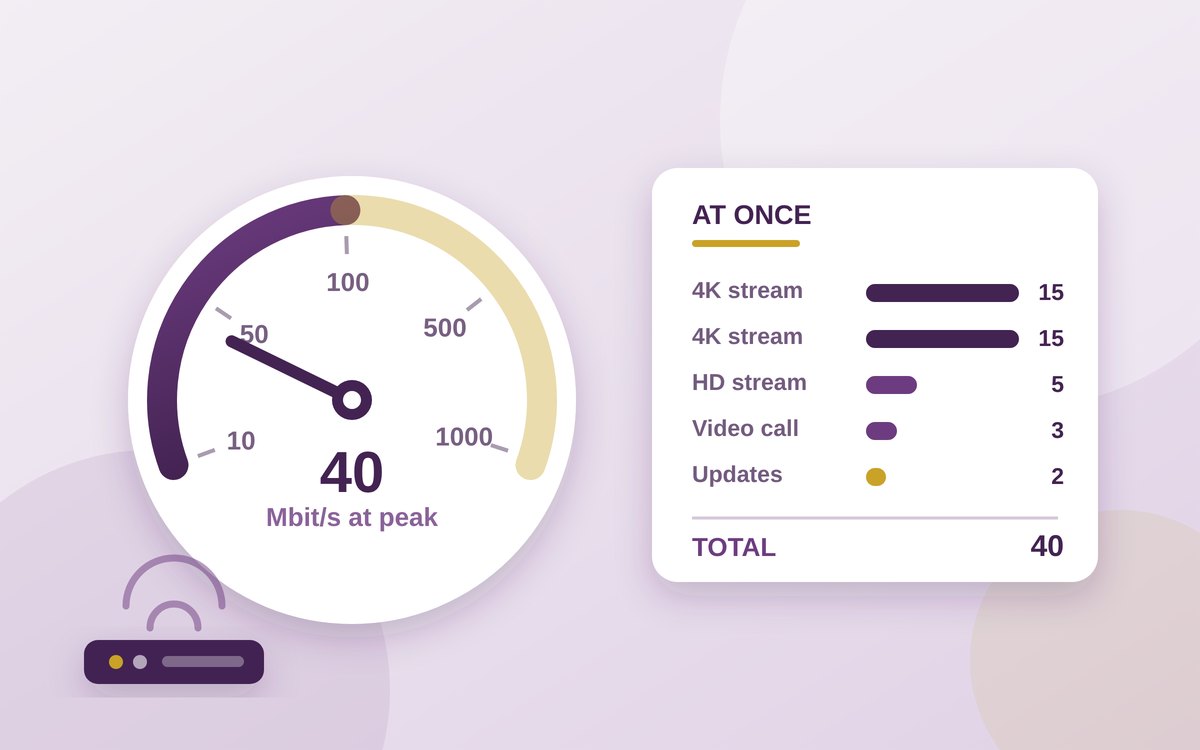
A couple at peak: one 4K stream at 15, one 1080p stream at 5, a 1080p video call at 3 down, and a few megabits of background traffic for updates, backups and smart-home chatter. That totals roughly 25 Mbit/s down. A household of four doing the worst thing all at once: two 4K streams at 15 each, one 1080p stream at 5, one 1080p call at 3, plus background. Call it 40 Mbit/s down and under 5 Mbit/s up.
That arithmetic explains why a 50 to 80 Mbit/s service feels indistinguishable from a 500 Mbit/s one for ordinary use, and why the FCC's 100/20 benchmark is a sensible place to sit: it covers the realistic peak roughly twice over, leaving room for the thing nobody budgeted for. It also explains why upgrading from 200 to 900 Mbit/s usually changes nothing a person can perceive while watching television. Streams do not go faster; they go at the bitrate the encoder chose.
Advertisement
The side that runs out first
Upload is where the published figures and the tariffs part company most sharply. Notice that Zoom asks for more upstream than downstream on a 1080p call: 3.8 Mbit/s up against 3.0 Mbit/s down, because your camera feed leaves once and arrives once per participant. Microsoft's recommended Teams figures run the same way at the minimum end. Add cloud photo backup, a security camera uploading continuously, and someone pushing a large file to a work drive, and the upstream direction is the one that saturates.
This is why the shape of a connection matters more than its size. A cable or copper service advertised at 500 Mbit/s down may offer 25 or 50 up; the UK universal service floor reserves only 1 Mbit/s up against 10 down. A symmetric full-fibre service at 100 Mbit/s each way will handle a houseful of video calls more comfortably than an asymmetric 500 Mbit/s one, and the FCC's choice of a 20 Mbit/s upload floor — and a 500 Mbit/s upload in its long-term goal — reflects exactly that. If you work from home, the upload figure is the number to compare between tariffs, and it is usually the one printed smallest.
Why the line speed is not the speed you get
A tariff describes the capacity arriving at the network termination point. Three things stand between that and the device in your hand, and none of them improve when you buy a bigger number.
The first is the wireless link. A single radio link shared by a dozen devices through two internal walls is the most common reason a gigabit line delivers fifty megabits to a laptop, and it is a problem of placement and topology rather than of capacity — which is the subject of our guide to what actually fixes a dead spot. The second is latency: the time a packet takes to make the round trip, which governs how responsive a call, a game or even a web page feels, and which is entirely independent of throughput. The US BEAD programme treats a location as underserved if latency exceeds 100 milliseconds, a threshold the FCC cites in its own report; the figure is a reminder that a connection can be fast and still feel slow. The third is the far end. A streaming service, a game store or a work VPN has its own capacity, and no home tariff can make a congested server send data faster.
The practical consequence is that when a connection misbehaves, the line speed is usually the last thing worth changing. A speed test run over Wi-Fi measures the weakest link in the chain, not the line.
How much data a household really moves
There is a second number, rarely quoted, that puts the whole exercise in perspective. Ofcom's Connected Nations report for 2025 records average data use of 583 GB per connection per month as at July 2025, rising to 738 GB on full-fibre connections.
Spread evenly, 583 GB a month works out at a sustained average of roughly 1.8 Mbit/s — below the UK's own definition of a deficient line. That arithmetic is not an argument for buying a 2 Mbit/s service; it is an illustration of how spiky household demand is. Almost all of that volume arrives in a few hours of the evening, in bursts, and the purpose of a large connection is to absorb the bursts without anyone noticing. Sizing for the peak is correct. Sizing as though the peak ran all day is what the upsell relies on.
Ofcom's coverage figures add useful context for anyone comparing options: 87 per cent of UK residential premises could get a gigabit-capable service in 2025 and 78 per cent could get full fibre, while 56 per cent of those with gigabit-capable access had actually taken a gigabit-capable service. Availability has run well ahead of demand.
The one place raw speed pays
If streaming and calling are capped by the encoder, large file transfers are not. A download takes whatever capacity it is given, and this is the single use where a gigabit tariff produces an effect you can feel.
The arithmetic is simple. A 100 GB game or console update is 800,000 megabits. At a full 10 Mbit/s that is about 22 hours; at 40 Mbit/s, about five and a half; at 100 Mbit/s, a little over two; at 1 Gbit/s, roughly thirteen minutes. Those are ceilings rather than forecasts — protocol overheads, storage write speed and the store's own servers all intervene — but the ranking holds. Anyone who regularly pulls down console-sized downloads, moves video files, or restores a machine from a cloud backup gets real value from capacity. Anyone whose heaviest day is two televisions and a work call does not.
Working out your own number
- Count the simultaneous 4K screens. Each one is 15 to 20 Mbit/s and they are the largest single item in the budget. Two is 40; four is 80.
- Add four megabits per concurrent video call, in each direction. The published figures are 3 to 4 Mbit/s, and the upstream half is the one that matters.
- Add a margin, not a multiple. Doubling the peak covers background updates and the unexpected. Multiplying it by twenty buys headroom nothing will use.
- Compare upload figures first if anyone works from home. A symmetric 100 beats an asymmetric 500 for calls, backups and cameras.
- Check latency claims separately. Throughput and responsiveness are different properties; a line can be fast and still feel sluggish.
- Test over a cable before blaming the tariff. A wireless speed test measures the weakest link in your home, which is rarely the line.
- Weigh large downloads honestly. If you move hundreds of gigabytes a month, capacity pays. If you watch television, it does not.
The published numbers have been remarkably stable while the tariffs have climbed by an order of magnitude. That is not a conspiracy; capacity genuinely got cheaper, and higher-resolution formats and symmetric fibre will eventually use some of it. But it does mean the honest answer to “how much speed do I need” is usually a smaller number than the one being offered, and that the figure worth negotiating over is the upload.
Sources
- Ofcom — Connected Nations UK Report 2025, published 19 November 2025 (decent broadband defined as at least 10 Mbit/s download and 1 Mbit/s upload; about 340,000 premises, 1 per cent, without decent broadband over a fixed line, falling to about 44,000, 0.1 per cent, including fixed wireless access; gigabit-capable coverage 87 per cent and full fibre 78 per cent of residential premises; average 583 GB per connection in July 2025 and 738 GB on full fibre; 56 per cent take-up of a gigabit-capable service where available)
- Federal Communications Commission — 2024 Section 706 Report, FCC 24-27 (fixed benchmark raised to 100 Mbit/s download and 20 Mbit/s upload from 25/3; long-term goal of 1 Gbit/s download with 500 Mbit/s upload; NTIA BEAD treatment of latency above 100 milliseconds as underserved)
- EUR-Lex — Decision (EU) 2022/2481 establishing the Digital Decade Policy Programme 2030, Article 4(2)(a) (all end users at a fixed location covered by a gigabit network up to the network termination point, and all populated areas covered by next-generation wireless high-speed networks performing at least equivalently to 5G, by 2030)
- Netflix Help Centre — Internet connection speed recommendations (3 Mbit/s or higher for HD 720p, 5 Mbit/s or higher for Full HD 1080p, 15 Mbit/s or higher for Ultra HD)
- YouTube Help — System requirements (recommended sustained speeds of approximately 20 Mbit/s for 4K, 5 Mbit/s for 1080p, 2.5 Mbit/s for 720p, 1.1 Mbit/s for 480p and 0.7 Mbit/s for 360p)
- Zoom Support — System requirements and bandwidth (one-to-one 720p at 1.2 Mbit/s up and down; group 720p at 2.6 Mbit/s up and 1.8 Mbit/s down; 1080p at 3.8 Mbit/s up and 3.0 Mbit/s down; screen sharing without video thumbnail at 50–75 kbit/s)
- Microsoft Learn — Prepare your organisation's network for Microsoft Teams (audio recommended 58 kbit/s up and down; video meetings minimum 150 kbit/s up and 200 kbit/s down, recommended 2.5 Mbit/s up and 4 Mbit/s down; live events approximated at 2 Mbit/s per viewer, 3 Mbit/s for 1080p)