SD card speed classes explained: C10, U3, V30, A2 and Express
The biggest number on the label is the one with no promise behind it. The guarantees are the small symbols crowded around it — and each of them measures a different thing, for a different kind of device. Reading them properly takes five minutes and stops you buying the wrong card twice.
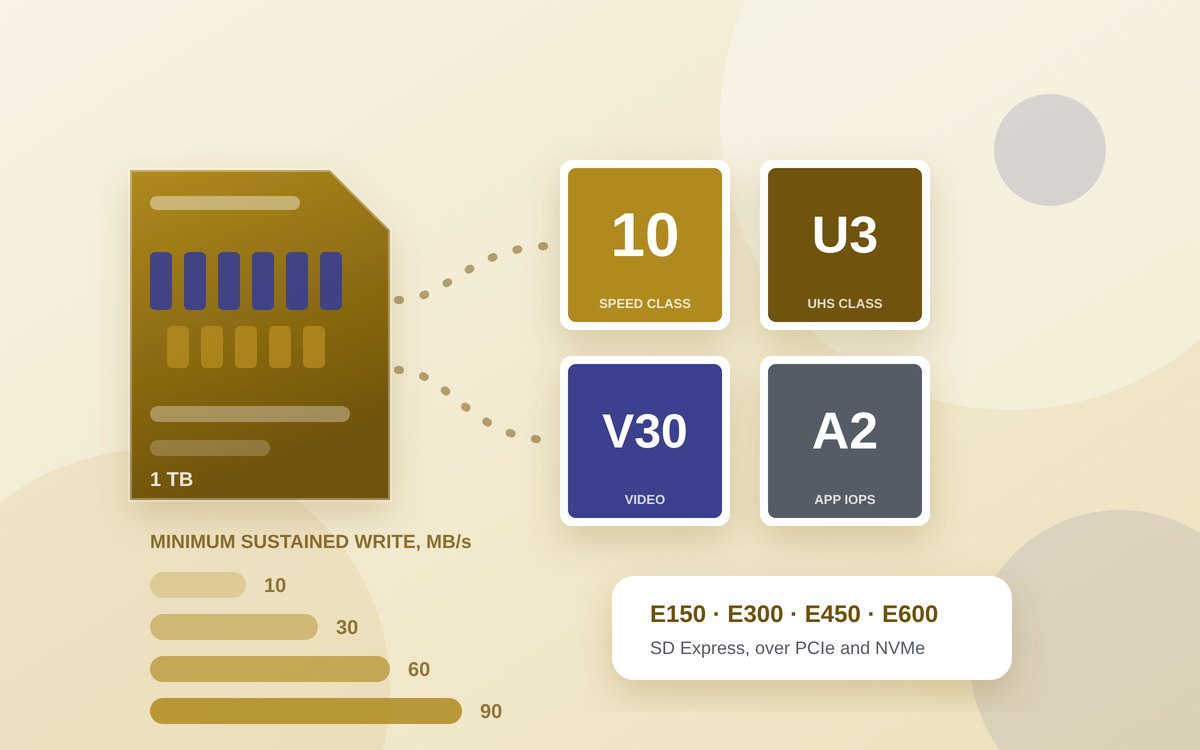
A memory card is one of the few things you can buy where the most prominent figure on the packaging is explicitly not a commitment. “Up to 200 MB/s” describes a best-case read under conditions the manufacturer chose, on a host most buyers do not own. Nothing about it tells you whether a camera will stop recording halfway through a clip, or whether a games console will accept the card at all.
The commitments are the symbols huddled next to it: a number inside a C, a number inside a U, a V followed by a number, an A followed by a number, and more recently an E. Each belongs to a different specification published by the SD Association, the body that defines the SD standard, and each certifies a minimum rather than a maximum. They are not interchangeable, and the one that matters depends on what the card is going into. This guide works through all of them using the Association's own documentation and the device makers' own published requirements. There are no measurements of our own here, and where a figure comes from a manufacturer's testing rather than the standard, it is attributed.
On this page
- The short answer
- Two separate things: the bus and the class
- Why the advertised number is a ceiling, not a floor
- The write-speed marks: C, U and V
- What Video Speed Class adds
- A1 and A2: the random-access marks
- SD Express and the E classes
- Capacity tiers, briefly
- The Switch 2 case, and why it matters
- Which class do you actually need?
The short answer
- C, U and V marks all certify minimum sustained write speed. C10, U1 and V10 all mean the same 10 MB/s floor; U3 and V30 both mean 30 MB/s. The duplication is historical, not meaningful.
- A1 and A2 certify something completely different — random read and write operations per second, which is what matters when apps run from the card rather than when video is written to it.
- The bus is separate from the class. UHS-I, UHS-II and SD Express describe how fast data can move across the pins at all; a V30 card on a UHS-I bus and a V30 card on UHS-II make the same written promise.
- “Up to X MB/s” is a read figure with no floor attached, usually quoted from the maker's own testing, and it will not be reached on a host that lacks the matching bus.
- Buy for the floor your device needs, not the ceiling. A 4K camera needs V30 or better; a single-board computer or a phone wants A2; a Nintendo Switch 2 will not take anything except microSD Express.
Two separate things: the bus and the class
Almost all memory-card confusion comes from collapsing two independent properties into one idea of “speed”. The first is the bus interface: the electrical and protocol arrangement that sets how fast data can physically cross between card and host. The second is the speed class: a guaranteed minimum the card must never fall below while the host keeps to the access rules in the specification. The bus sets the ceiling; the class sets the floor. A card can be excellent at one and unremarkable at the other.
The bus tiers, with the maximum transfer rates the SD Association and card makers publish for each:
| Bus interface | Published maximum | Pins | Where you meet it |
|---|---|---|---|
| UHS-I | Up to 104 MB/s | Single row | The overwhelming majority of cards and card slots |
| UHS-II | Up to 312 MB/s | Second row added | Professional cameras, some computer card readers |
| UHS-III | Up to 624 MB/s | Second row | Specified, but rarely implemented in consumer products |
| microSD Express | Up to 985 MB/s | Second row, PCIe/NVMe | Nintendo Switch 2 and a growing set of readers |
| SD Express (SD 8.0, two lanes) | Up to 3,938 MB/s | PCIe 4.0 ×2 | Full-size cards, early products only |
One detail in the Association's SD 8.0 white paper saves a lot of grief: every SDHC, SDXC and SDUC card with SD Express also carries a UHS-I interface, so an Express card dropped into an ordinary slot still works — just at ordinary speeds. Express performance needs both ends to support it, and PCIe generations are negotiated during link-up, so any Express card operates in any Express host at the highest mode they share.
Why the advertised number is a ceiling, not a floor
Read the specification sheets and the asymmetry is plain. SanDisk, for its microSD Express cards, publishes sequential reads of up to 880 MB/s, with writes stated separately and varying by capacity — around 480 MB/s at 128 GB, up to 650 MB/s at 256 and 512 GB, and up to 800 MB/s at 1 TB. Those are the manufacturer's own figures for its own product, not a standard anybody tests against, and they are all phrased as maxima.
Three things pull real throughput below them. The bus: a 200 MB/s card in a UHS-I reader cannot exceed what UHS-I allows. File size: sequential figures assume large contiguous transfers, and a folder of thousands of small files behaves nothing like one large video. And condition: a card that is nearly full, or recycling previously written blocks, does more work per write than a fresh one.
The class marks exist precisely because that ceiling was useless for the one question cameras needed answered: can this card keep up, continuously, for as long as recording lasts?
The write-speed marks: C, U and V
There are three generations of minimum-write symbol, introduced as cards got faster, and they overlap heavily. All of them state a minimum sustained sequential write in megabytes per second.
| Family | Symbols | Minimum sustained write | Notes |
|---|---|---|---|
| Speed Class | C2, C4, C6, C10 | 2, 4, 6, 10 MB/s | The original scheme; a number inside a broken circle |
| UHS Speed Class | U1, U3 | 10 and 30 MB/s | A number inside a U; introduced with the UHS bus |
| Video Speed Class | V6, V10, V30, V60, V90 | 6, 10, 30, 60, 90 MB/s | The current scheme, designed around video recording |
So C10, U1 and V10 are three ways of writing the same 10 MB/s floor, and U3 and V30 are two ways of writing
30 MB/s. Cards routinely carry several at once because different cameras look for different symbols in their
own documentation. A card marked C10 U3 V30 is not three times as fast as one marked V30; it is the
same floor, stated for three audiences.
What Video Speed Class adds
Video Speed Class is not simply a renaming exercise. The Association ties each class to the bus families that can actually sustain it: V6 and V10 apply to the High Speed and UHS families, V30 to the UHS family, and V60 and V90 to UHS-II and UHS-III products. That is why you will not find a genuine V90 microSD card working at V90 speeds in a single-row UHS-I slot — the floor is only guaranteed where the bus can hold it.
In practice V30 is the common floor camera makers specify for 4K recording, with V60 or V90 appearing in requirements for 8K and high-bit-rate professional formats. Check what the camera's own documentation asks for rather than reasoning from resolution, because bit rate, not pixel count, is what the card has to absorb.
Keep reading
A1 and A2: the random-access marks
The Application Performance Class answers a different question. Android's adoptable-storage feature made it possible to install and run apps from a memory card, and app behaviour is dominated not by sustained sequential writes but by thousands of small scattered reads and writes — the same property that separates a solid-state drive from a spinning one. A card can hold a comfortable 30 MB/s sequential floor and still make a phone or a single-board computer feel sluggish.
So A1 and A2 certify operations per second instead, alongside a sequential minimum.
| Class | Minimum random read | Minimum random write | Minimum sustained sequential write |
|---|---|---|---|
| A1 (SD Physical 5.1) | 1,500 IOPS | 500 IOPS | 10 MB/s |
| A2 (SD Physical 6.0) | 4,000 IOPS | 2,000 IOPS | 10 MB/s |
The jump from A1 to A2 is the interesting part, and it comes with a condition. The Association's own description of A2 is that the higher figures are reached by using Command Queuing and Cache functions, along with maintenance functions that let the card tidy its flash efficiently. Command queueing has to be supported at both ends. On a host without it, an A2 card does not necessarily behave like an A2 card — a point worth holding on to, because A2 cards are frequently sold to people whose devices cannot use the mechanism that makes A2 meaningful.
Raspberry Pi's documentation for its own branded cards is unusually candid about this. Those cards are rated C10, U3, V30 and A2 and support the DDR50 and SDR104 bus speeds plus the command-queueing extension, and the figures Raspberry Pi publishes are stated against a specific host: 5,000 random 4 KB read IOPS and 2,000 random 4 KB write IOPS on a Raspberry Pi 5 over SDR104. Its explanation is the clearest short account of the mechanism anywhere — command queueing “permits a degree of pipelining of random read operations” — and those are Raspberry Pi's own measurements on its own board, not a specification minimum.
Advertisement
SD Express and the E classes
SD Express abandons the SD bus for the one inside your computer: PCIe, carrying NVMe, the same pairing used by laptop solid-state drives. SD 7.0 and 7.1 defined a single PCIe 3.1 lane at up to roughly 985 MB/s. SD 8.0 added a single PCIe 4.0 lane at about 2 GB/s and a dual-lane configuration the Association puts at up to 3,938 MB/s.
Raw bus speed, though, has the same problem the original advertised figures had, so SD 9.1 introduced a matching set of floors: the SD Express Speed Classes. These work like Video Speed Class but over NVMe.
| Class | Minimum sustained sequential write |
|---|---|
| E150 | 150 MB/s |
| E300 | 300 MB/s |
| E450 | 450 MB/s |
| E600 | 600 MB/s |
Three rules in that specification are worth knowing. The guarantee applies when both card and host use the PCIe bus and follow the Express access rules, and it covers up to eight concurrent data streams. A card certified at a given class must hold that minimum across every PCIe mode defined in any Express specification — so a card is not allowed to meet its class only in its fastest configuration. And the classes are hierarchical: a card supporting a higher class must support all the lower ones too.
Capacity tiers, briefly
The other family of letters describes capacity, and it decides the file system. The SD standard covers up to 2 GB on FAT12 and FAT16; SDHC, over 2 GB up to 32 GB on FAT32; SDXC, over 32 GB up to 2 TB on exFAT; SDUC, over 2 TB up to 128 TB, also on exFAT. A host that predates a tier generally cannot read it — the usual explanation for an older camera rejecting a large card everything else accepts. Reformatting does not help, because the limitation is the host's addressing, not the format.
The Switch 2 case, and why it matters
The clearest illustration of all this arrived with the Nintendo Switch 2, because Nintendo did something unusual: it made the bus mandatory. Nintendo's support documentation states plainly that the console is only compatible with microSD Express cards, up to 2 TB, and that inserting a standard microSD card previously used in an original Switch will not let you save or load digital games or save data. The first use of an Express card also requires a system update over the internet.
This is the first mass-market device where the second row of pins is a hard requirement rather than an optional upgrade, with an awkward consequence: a perfectly good, fast, expensive UHS-I card — V30, A2, the lot — is simply the wrong product. No class mark compensates for a missing interface, so check the bus requirement first and the class second.
It also makes the counterfeit problem worse. Express cards sell at a premium, the logo is easy to print, and a fake has no reason to behave. The reasoning that applies to spotting a fake or unsafe charger transfers almost unchanged: buy from the manufacturer or a retailer that would have to answer for it, distrust capacity-per-pound that undercuts everyone, and verify the card by writing and reading real data before you trust anything to it. A card holding the only copy of something is not a backup — it is a single point of failure with a logo on it.
Which class do you actually need?
Most people over-buy on the symbol that is easiest to compare and under-buy on the one their device actually uses. Match the mark to the job.
| What the card is for | Look for | Why |
|---|---|---|
| Photos on a phone or compact camera | C10 or U1 (V10) | Stills are bursty, not sustained; 10 MB/s is ample |
| 4K video on a camera, drone or action camera | V30 (or U3) | The common floor camera makers specify; check the model's own requirement |
| 8K or high-bit-rate professional video | V60 or V90, on a UHS-II host | Those classes are only defined for UHS-II and UHS-III |
| Running an operating system or apps from the card | A2, on a host with command queueing | Random IOPS, not sequential write, is the bottleneck |
| A dash camera or security camera | V30 plus a high-endurance product line | Endurance is a manufacturer claim, not an SD class — read the maker's rating |
| Nintendo Switch 2 | microSD Express, nothing else | Nintendo states no other card type will save or load games |
| Fast offloading to a computer | A UHS-II or Express card and a matching reader | The slower end sets the speed; a fast card in a slow reader gains nothing |
Two habits beyond the purchase do more than any upgrade in class. Format the card in the device that will use it, using that device's own format function, rather than on a computer — the host lays out the card the way its firmware expects. And leave headroom: a card run permanently near full has fewer free blocks to work with, and sustained write performance is the first thing to suffer.
None of these symbols is marketing invention. Each is a published minimum, testable, and genuinely useful once you know which question it answers. The problem is only ever that the number printed largest is the one answering no question at all.
Sources
- SD Association — Speed Class overview (Speed Class, UHS Speed Class, Video Speed Class and SD Express Speed Class families; which bus families each Video Speed Class applies to)
- SD Association — Application Performance Class (A1 introduced in SD Physical 5.1, A2 in 6.0; A2 reliant on Command Queuing, Cache and maintenance functions)
- SD Association — Application Performance Class white paper (A1: 1,500 random read IOPS, 500 random write IOPS, 10 MB/s sustained sequential write)
- SD Association — SD Express Speed Class, SD 9.1 (E150 to E600 minimums; PCIe access rules, eight concurrent streams, all PCIe modes, hierarchical classes)
- SD Association — Navigating the fast lanes: SD Express Speed Classes (class symbols and minimum performance table)
- SD Association — SD Express cards with PCIe and NVMe interfaces, SD 8.0 white paper (bus speeds by specification; every SD Express card also carries UHS-I; PCIe negotiation at link-up)
- SD Association — Capacity: SD, SDHC, SDXC and SDUC (capacity ranges and default file systems)
- Kingston — a guide to speed classes for SD and microSD cards (C2 to C10, U1 and U3, V6 to V90 minimums; UHS-I, UHS-II and UHS-III bus maxima)
- Kingston UK — naming conventions and labels on SD and microSD cards (A1 and A2 IOPS figures; origin in Android adoptable storage)
- Lexar — guide to UHS and microSD Express speeds (pin rows per interface; microSD Express up to 985 MB/s over PCIe Gen 3 and NVMe)
- Raspberry Pi — SD card product brief (C10, U3, V30, A2; DDR50 and SDR104 with command-queueing extension; 5,000 random read and 2,000 random write IOPS on Raspberry Pi 5 over SDR104)
- SanDisk — microSD Express memory card specifications (sequential read up to 880 MB/s; write maxima by capacity, manufacturer's own figures)
- Nintendo — microSD card and microSD Express card compatibility (Switch 2 only compatible with microSD Express, up to 2 TB; standard cards cannot save or load games; system update required on first use)